Nones. Baby care tracking, redesigned for exhausted parents.
The impact
A product design exploration that reframes baby tracking from “fill out a form” to “capture a moment”—with logging in seconds, patterns parents actually recognize, and insights in plain language instead of spreadsheet charts.
The context
Baby trackers share the same checklist—sleep, feeds, diapers, graphs—but often fail when a parent is half asleep at 3 a.m.
I built Nones because I needed it. As a parent of a young baby, I used existing tracking apps and hit every one of these failure modes firsthand — logging events one-handed in the dark, finding last night's sleep split across two calendar days, staring at charts that couldn't answer the question I actually had. The context isn't hypothetical.
Most tools optimize for data completeness, not speed, context, or calm. Calendar midnight splits “last night and this morning” into two days. Dashboards show numbers without answering “Is this week different?” Clinical UIs feel at odds with a tender, high-anxiety life stage.
Nones (prototype codename: Kiddo) is a responsive web app for caregivers of babies 0–12 months: log infant care in seconds, see patterns without spreadsheets, and understand sleep the way parents think about “a day.” The high-fidelity prototype runs on realistic longitudinal data (~70k events, normalized from an existing tracker export) so flows and visual density reflect months of real use—not lorem ipsum.
Design bet
Fewer taps, logical days aligned to parent memory, and rule-based insights with visible confidence beat raw charts for daily use—while still offering depth (heatmap, trends) for planning partners and pediatric conversations.
Users & jobs
Primary: the night-shift logger — one-handed logging in dim light; needs “when did we last…?” more than archives; wants reassurance without becoming a data analyst.
Secondary: the planning partner — weekly trends, bedtime drift, nap length, feeding gaps; uses visualization for family or pediatrician check-ins.
| Job | How the prototype supports it |
|---|---|
| Log an event in under 10 seconds | Quick Add grid + entry drawer, no page churn |
| Know time since last sleep/feed | “2h ago” subtitles on Quick Add cards |
| Understand last night vs. recent weeks | Sleep heatmap + weekly insight cards |
| Spot shifts early | Insights with low / medium / high confidence |
| Review history when needed | Filterable timeline, infinite scroll by logical day |
Design principles
- Log first, refine later — Minimum fields by default; details live in a drawer.
- Meet parents where time lives — A logical day runs 19:00 → next day 18:59 (evening + morning as one unit).
- Speak human — Insights use titles and sentences, not axis labels alone.
- Calm visual weight — Soft pink palette, rounded surfaces, Bricolage Grotesque for brand moments; dark mode for night use.
- Show your work — Insight confidence sets expectations when data is sparse.
- One system, many surfaces — The same entries power Quick Add, feed, heatmap, insights, and stats.
Solution overview
Login / Demo
└── App shell (sidebar desktop · bottom nav mobile)
    ├── Home — profile, Quick Add, weekly insights, timeline feed
    ├── Sleep heatmap
    ├── Stats (sleep · feeding · growth)
    ├── Settings (profile · quick add · theme)
    └── Global: timer banner · entry drawer
| Pillar | What we designed |
|---|---|
| Capture | Configurable Quick Add (3 + “More”), timers, category-based Add Entry |
| Orient | Time-ago on Quick Add, baby age in header |
| Understand | Weekly insight cards, sleep heatmap, Recharts stats |
| Personalize | Pick three Quick Add activities, avatar, light/dark theme |
Twenty-plus event types roll up into caregiver-facing categories (food, activity, growth, health, milestones, mood)—each with icon, color, fields, and timer rules in a single config so design and engineering stay aligned.
Key design decisions
Logical day (19:00 boundary)
Sleep, insights, and heatmap rows group by a logical day starting at 19:00, not calendar midnight—matching how parents describe “last night and this morning.” Daytime sleep sits in 11:00–19:00 inside that day; night sleep is everything else, with feeding overlays on the heatmap for context.
Quick Add as the home screen hero
Three large, configurable actions (default: Sleep, Nursing, Nappy) plus “Add.” Subtitles show time since last log (“Tap to log” / “2h ago”), turning the grid into a status board families can tailor in Settings.
Drawer-based logging
Create and edit entries in a bottom drawer with scrim; timer stop uses the same pattern—preserving dashboard context and scroll position on the feed.
Active timer banner
A persistent banner while sleep or nursing timers run, with pause/stop and side selection for nursing—visible across views without blocking content.
Weekly insights as cards
Up to ~16 prioritized, deterministic patterns (sleep, food, cross-domain) as textured cards with category chips and confidence—transparent and explainable, not a black-box model. Detectors require minimum nights before firing to reduce false alarms.
Sleep heatmap as the “truth” view for nights
Rows = logical days; columns = time from 19:00 through the next evening; layers for night sleep, day sleep, and feeds. Row tap opens a day summary drawer shared with Stats.
Stats behind a “PRO” nav badge
Rich charts live on a separate nav item—keeps home calm for daily logging while signaling depth for analytical users and stakeholder conversations.
Timeline at scale
Feed grouped by logical day, chip filters (sleep, feeding, nappy, growth, health, milestones, mood, other), infinite scroll in 14-day chunks via intersection observer.
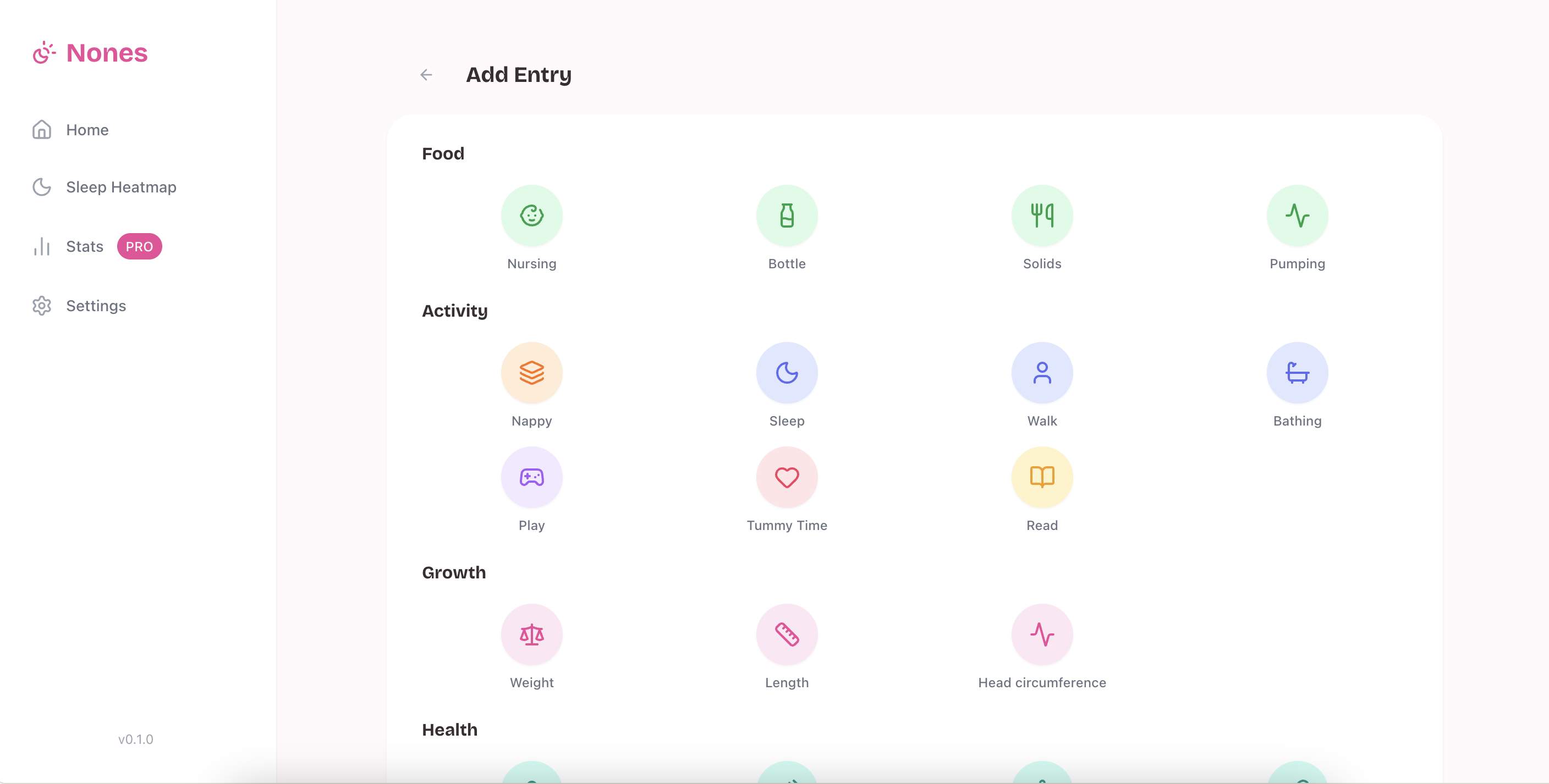
Add Entry — category grid opened from Quick Add or “More”
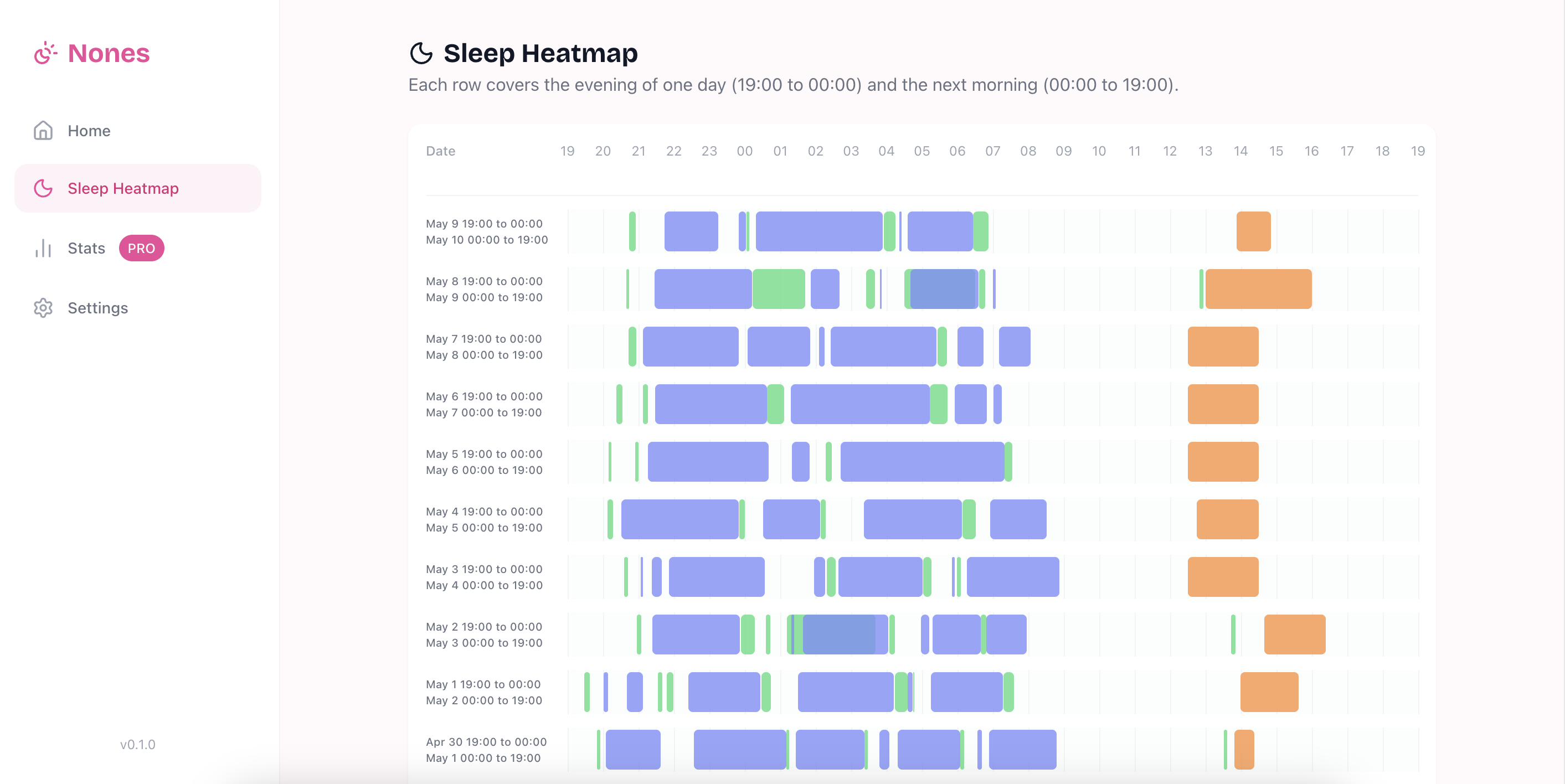
Sleep Heatmap — logical days from 19:00, with night sleep, day sleep, and feeds
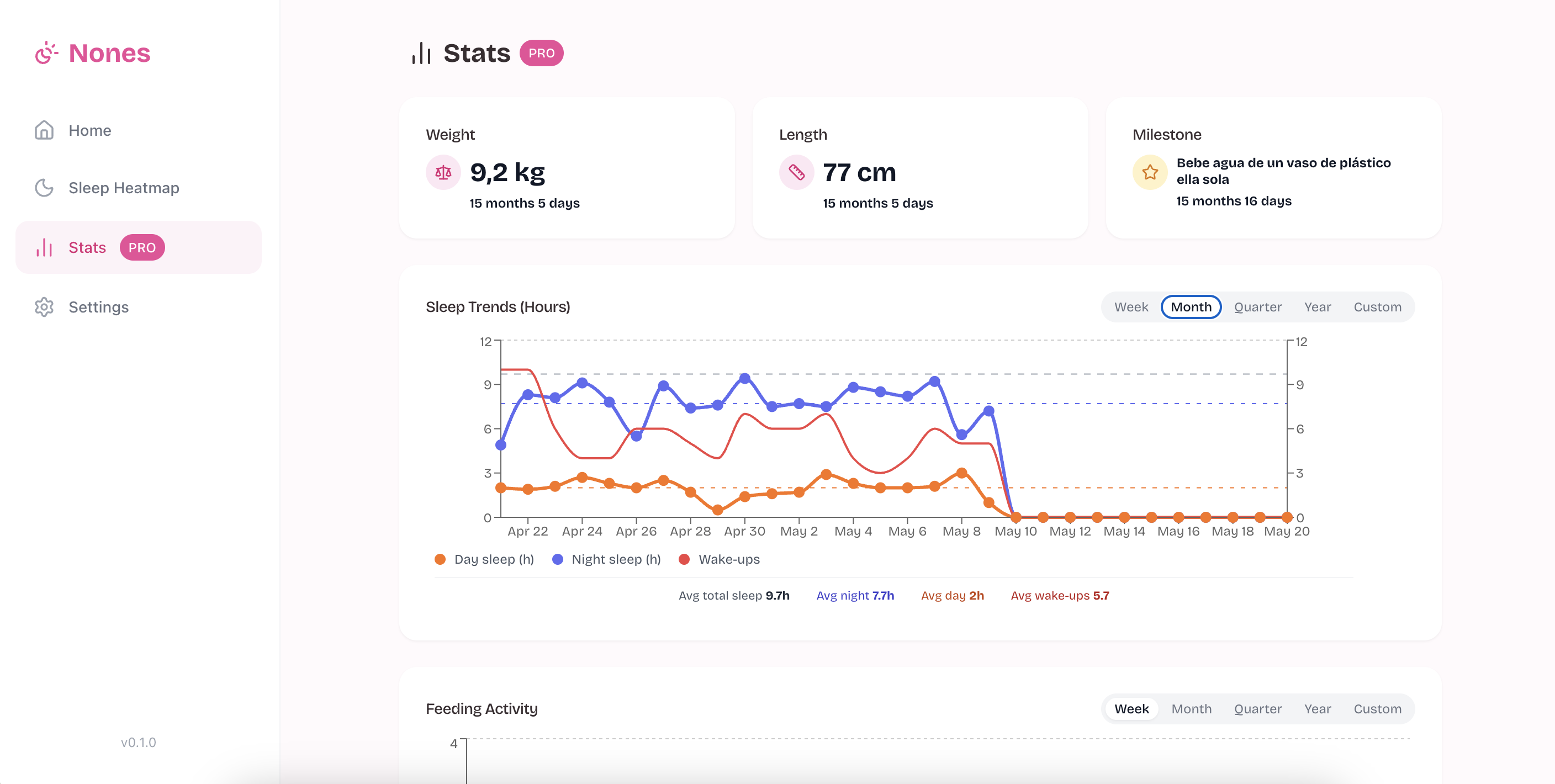
Stats (PRO) — sleep trends, feeding activity, and growth milestones
Visual & design system
- Typography: Bricolage Grotesque for display; system UI for density
- Color: Soft pink primary (
#FF9EB5family), warm neutrals, semantic activity hues - Components: shadcn/ui + Radix for accessible primitives; Lucide icons mapped per activity type
- Responsive: Fixed sidebar + 4-column Quick Add on desktop; bottom tab bar + 2-column Quick Add on mobile
Prototype
Stack: React 19, Vite, Tailwind, shadcn/ui + Radix, Recharts · client-side persistence (localStorage), demo mode for reviewers.
Data: Seed export normalized into a canonical schema; migration layer maps legacy shapes; fingerprinting refreshes mock data when bundled JSON changes—usable for usability sessions with believable busy and sparse weeks.
Insight engine: Rule-based detectors (bedtime shift, wake-ups, nap changes, feeding intervals, cross-domain links) ranked by priority and confidence—designed for auditable copy and card layout, not opaque ML.
Representative flows
- Log sleep in two taps — Tap Sleep on Quick Add → adjust in drawer or use timer banner → entry appears on today’s logical day; heatmap and insights update on render.
- Morning review — Scan weekly insight cards → open Sleep Heatmap → tap a row for day summary (feeds + sleep segments).
- Customize — Settings: three Quick Add types, name, birth date, avatar, dark mode for night logging.
Early validation
The prototype was shared with parents of babies 0–12 months and sleep coaches. Key observations:
The logical day boundary (19:00) was the most discussed decision — parents consistently recognized it as matching how they already talked about their nights. The "time since last log" subtitle on Quick Add was described as the first thing eyes went to when opening the app.
Formal usability studies are next; the prototype's realistic data seed (~70k events) makes sessions feel representative of months of real use rather than an empty app.
Status & next steps
Interactive prototype (v0.1) with end-to-end flows: demo/login → log → feed → heatmap → stats → settings. Pattern detectors covered by dedicated test scripts.
Next: Validate the 19:00 logical day with diary studies; one-handed usability at night; co-design insight copy with parents; competitor import onboarding; trust, export, and household sharing; native mobile (widgets, haptics, offline queue).
Role
Solo — product design and engineering. End-to-end: problem framing from personal experience, jobs-to-be-done research, domain modeling (logical days, entry schema, insight detectors), visual system, and high-fidelity prototype built in React. Designed and coded by the same person who needed the product.